Getting Started
This guide will help you log in and start using PNW’s website editing tool.
Follow the steps listed below, and you’ll be ready to make updates!
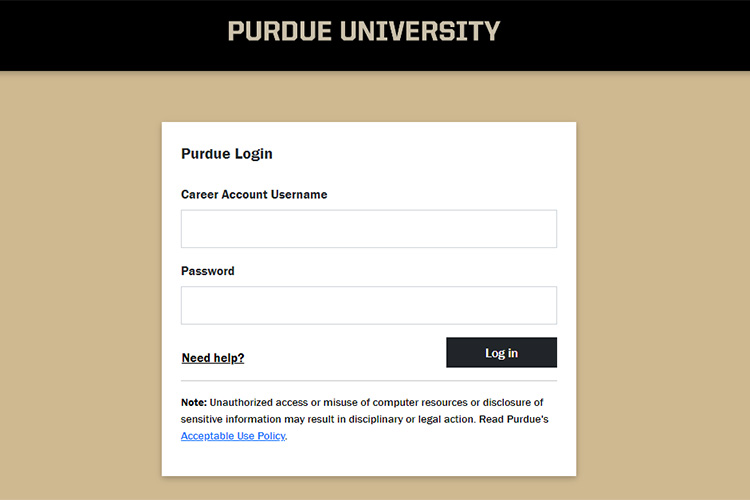
Logging in to the PNW website
The PNW website uses WordPress, a content management system (CMS), which requires internet and VPN access.
- Open your web browser.
- Go to pnw.edu/login.
- To log in, you’ll need to be on campus or connected via VPN.
- Sign in with your Purdue username and password.
- Approve the two-factor authentication prompt.
- You’re logged in!
Please note: To log in, you will need to be on a campus network or connected via VPN to access the page.
Navigating the CMS
Explore tips for navigating the PNW website when you are logged in.
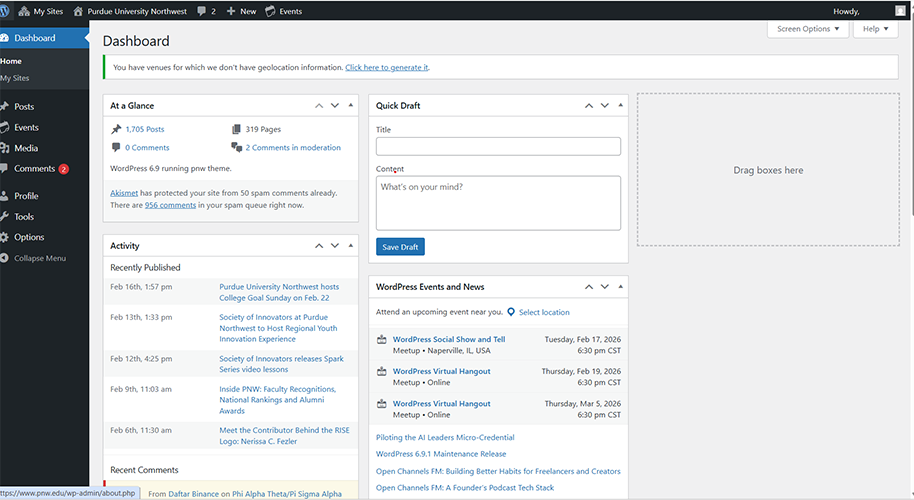
Once you have successfully logged in, you will be redirected to the WordPress Dashboard.
The dashboard provides an overview of site content and serves as a helpful “home base” while working on the site.
You can navigate back to the dashboard at any point by clicking the “Dashboard” icon at the top of the left sidebar.
The black ribbon at the top of the screen is called the “Ribbon Toolbar.” This toolbar allows you to easily navigate around the website.
| Icon | What It Does |
|---|---|
 | My Sites Where you will find a listing of all of the sites that you are able to edit. |
 | Current Site Lists the site that you are currently on. Allows you to quickly switch between the dashboard and live site. |
 | New Allows you to quickly create new posts, media, pages, events and tables. |
 | Events Quickly view the calendar or add new events. |
 | Account Edit your profile and log out from here. It is important to log out of WordPress when you are finished managing your content. |
Tip: If you work on multiple sites, always double‑check which one you’re accessing before making changes.
The left side menu contains all your main editing tools. This is where you will spend most of your time navigating between types of pages.
| Icon | What It Does |
|---|---|
 | Dashboard The main page you see after logging into the PNW website. |
 | Posts Where news and new-related content can be submitted to the Web Team for review. |
| Events Where upcoming events can be created and submitted for Web Team review. |
| Media Where uploaded content (images, files, etc.) can be viewed and edited. |
 | Posts The most central building block to the PNW website. You are on a page right now! |
 | TablePress Allows you to create and edit tables for the website. |
 | Collapse Collapses the side navigation pane. |